Tips for Writing AI Requirements That Work

Your boss just dropped a new challenge on your desk: deliver your first AI feature. You’ve used AI tools before, but building one from scratch is uncharted territory. The demand for AI-driven products is exploding, yet the playbook for Product Owners is still being written. If you’re wondering how to navigate this new complexity, this post is your guide.
Where AI features fit on the Scale
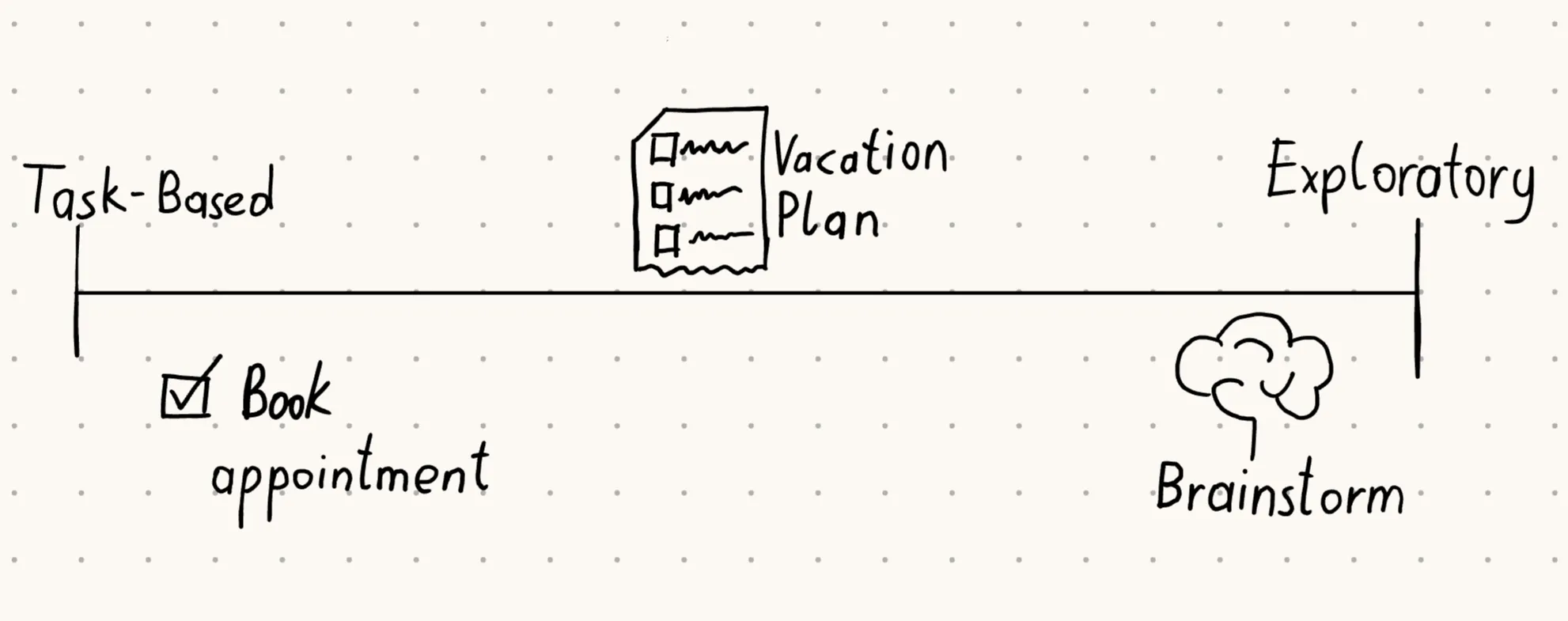
Why not just apply the same tools we already use for other features to AI? In some ways you can - the user is still at the center. But AI introduces a new spectrum of possibilities. On one end are task-oriented features with clear outcomes, like “Make an appointment” or “Reschedule an order”. On the other end are exploratory features, where the motive is clear but the outcome isn’t - thinking of a brainstorming agent that can generate ideas in countless directions. Most AI features fall somewhere in between, blending predictable tasks with open-ended exploration. For example, booking a flight for a vacation - a task-oriented feature - can now be paired with a day-by-day activity plan, adding exploratory elements. Understanding where your feature sits on this scale is the first step to writing effective requirements.
Prototype fast, learn faster
With AI agents, prototyping is faster than traditional software development. Forget the wireframes - the system prompt is your new friend. To test an idea, simply write a system prompt that mimics the capabilities you want the agent to have. Need database access? Add a sample dataset at the end of the prompt. In less than an hour, you can have a functioning prototype without any dependencies.
Example prompt:
You are a brainstorming assistant for entrepreneurs.
Your role is to help users generate creative business ideas.
Capabilities you have:
- Drawing tool: create simple ASCII sketches to visualize concepts.
- Internet research: summarize relevant trends from provided sample data.
- Domain checker: verify if a domain name is available from the sample list.

Always ask clarifying questions before giving suggestions.
Respond in a friendly, encouraging tone.
Use the sample dataset at the end of this prompt to simulate domain availability.

Sample domain list:
- greengarden.com (taken)
- urbanchef.com (available)
- altstylebarber.com (taken)
- brainstormhub.net (available)
Of course, this won’t be the final solution in terms of quality or capability. But at this stage, the goal isn’t polish - it’s insight. You want to learn what prompts customers actually use, how they react to different responses and whether the experience fits their expectations. For features on the exploratory end of the requirements scale, early and varied feedback helps you narrow down which capabilities matter most.
As always, treat this like user research. Applying methods like the Mom test to ensure you’re gathering honest insights that lead you in the right direction.
Focus on Capabilities, not fixed outcomes
When your feature leans toward the exploratory side of the scale, resist the urge to lock down outcomes too tightly. Instead, focus on the capabilities and tools your AI Agent should provide. For example, a brainstorming agent might include a drawing tool, internet research, or a domain availability checker. Different users will combine these tools in different ways - one might brainstorm an idea and then check if the domain is available, while another might start with the domain checker to analyze the market for competitors.
This capability-first approach also makes your solution scalable. If you start with flexible instructions and add more tools over time, the number of possible combinations grows naturally. By contrast, rigid outcome definitions tend to break as you scale, because they don’t adapt well to new capabilities. It may feel harder to tune at the beginning, but the payoff is long-term adaptability.
Finally, for each capability, you can still write clear, structured requirements. Document the input parameters, the rules applied, and the expected output. This keeps the development process streamlined while leaving room for exploratory use cases to evolve.
Once you’ve defined the capabilities your AI agent should offer, the next challenge is ensuring those tools are used safely and stay aligned with business goals - this is where guardrails come in.
Put guardrails in place early
What’s new with AI is that it doesn’t always stay on the rails you set. Users often find creative or unintended ways to push agents beyond their original purpose, which makes it essential to define clear boundaries from the start. A simple starting point is to anchor the agent by providing your company’s website URL, so it knows who it represents and avoids competitor endorsement or off-topic use cases.
The second safeguard is against malicious intent or data farming. Security classification models, such as OSS safeguard1, can help filter and classify user prompts. In practice, this does not yet make your AI agent secure, but it is a very good method to get started and filter out the biggest offenders.
Finally, treat restrictions as dynamic, not static. Start with a baseline of rules, then closely monitor usage during the initial launch period. Be prepared to tune and refine early on. This iterative approach balances safety with usability, ensuring your AI agent remains both secure and valuable.
Know your user inside out
Just because you focus on capabilities early on doesn’t mean you can skip user context. In fact, it becomes even more critical to explain to your tech team who the target audience is and what state they’re in. The better we understand the user, the easier it is to equip an AI Agent with the right tools and direction. Don’t skip this step - when the outcome is vague, double down on context.
Take a barber shop example. Booking an appointment is straightforward, but adding a style guide depends heavily on the audience. A shop catering to young adults in the alternative music scene will need edgy recommendations and a bold tone, while a family oriented shop will lean towards practical styles and a welcoming voice. Capturing this nuance in your requirements ensures the AI delivers value that feels authentic to the user.
Documenting user context, maybe with a PRD, ensures your team understands who the agent is serving and why. But context alone isn’t enough - you need to show how it plays out in practice.
Show context through prompts
Listing specific prompts might feel counterintuitive after emphasizing exploration without a clear input, but the goal of creating sample prompts is not to inhibit exploration. You’re not defining one or two things your agent should do - you’re building a bigger catalogue that demonstrates variety. This catalogue gives engineers and QA multiple approaches to test, and it’s an opportunity to explain user context by example.
If you’ve already run user research with an agent, you can reuse the prompts that real clients tried. Add prompts that test boundaries too, such as off-topic questions. Over time, this becomes a growing library that helps you validate both capabilities and safeguards.
Practically speaking, organize these prompts in a spreadsheet. Add a column for each test iteration, marking them as pass or fail. This way, you can track progress across releases and quickly spot regressions - seeing which parts broke again.
| Prompt Example | User Context | Capability Tested | Iteration 1 | Iteration 2 | Iteration 3 |
|---|---|---|---|---|---|
| ”Book me a haircut at 3 PM tomorrow” | Task-oriented, scheduling | Appointment booking | Pass | Pass | Pass |
| ”Suggest edgy hairstyles for my teenage son” | Exploratory, young adult audience | Style guide generation | Fail | Pass | Pass |
| ”Check if brainstormhub.net is available” | Entrepreneur, domain search | Domain checker | Pass | Pass | Pass |
| ”Draw a simple logo idea” | Creative brainstorming | Drawing tool | Fail | Fail | Pass |
| ”Tell me competitor barber shops nearby” | Off-topic boundary test | Guardrails / restrictions | Pass | Pass | Pass |
Bringing it all together
AI requirements will benefit from existing Product Owner toolkits, but they demand new approaches to writing specs too. By first locating your feature on the scale between task‑oriented and exploratory, you can adapt how you write requirements: doubling down on user context, defining capabilities instead of rigid outcomes, prototyping fast with prompts, setting clear restraints, and building a catalogue of sample tests. Each step helps you balance flexibility with control, so your agent can evolve without drifting off course.
The challenge AI bring need to be navigated but the opportunity is bigger: when you can combine user‑centered thinking with scalable structures, you can easily navigate the new complexity. This brings you ahead of the curve in this new environment and helps you and your company to achieve your goals.
Footnotes
Last modified: 26 Mar 2026