How One Daily Note Ends the Busywork
As a product owner, it often feels like you are constantly behind at least one meeting. There is always a status report you need to create, a to-do to catch up on, and oh don’t forget that one of your colleagues is off tomorrow for his son’s soccer match. This role can be a monumental task that is rarely mentioned in any job description. That’s why I went out to build my own productivity stack to reduce a lot of the busywork we have to do.
The Setup
The setup is AI based - it’s 2026 after all - and the technical specifics do not matter that much. You can use the model provider and note taking tool of your choice. The only thing that is required is that the AI has access to your notes and is able to create and edit them on its own.
For me that is a combination of Obsidian, which I have used for years, and OpenClaw, which manages the access to files and other tooling. I recommend running it on a dedicated server with proper security.
- Obsidian vault: the single source of truth for my daily notes, initiative planning, people files and knowledge base
- OpenClaw agents: that read, write and connect the dots between those files
Here is what the vault structure looks like:
vault/
├── Daily Notes/          <- raw material, decisions, action items
├── People/               <- person files, touchpoints, context
├── Initiatives/          <- project status, blockers, next steps
│   └── Initiative 1/     <- subfolder for bigger initiatives
├── Research/             <- industry intel, user interviews, book notes
└── Companies/            <- vendor context, stakeholder orgs
The Daily Note
Everything starts here. One note per day, that is mostly scribbles and contains all meeting notes, important decisions, completed to-dos and interesting tidbits I learned throughout the day. This is raw and unfiltered, with little formatting to fit the busy schedule, so it can be maintained throughout the day. Obsidian already has a daily note where I just cram everything in.
Timeline delayed? Dependency discovered? Learned that Steve’s favorite ice cream is hazelnut? All of that goes into the daily note. The lighter you keep it, the easier it stays when the calendar fills up. Don’t let it become a burden on your mind or schedule.
Bonus: if your company has meeting transcripts, put them in a separate note and reference it, that saves a ton of time too.
The daily note already gives you a paper trail, but the magic happens at 6pm.
The Evening Recap
At the end of the day, my agent reads everything I wrote in today’s daily note and generates a structured recap. It compresses the chaos into four sections:
- What got done - completed work, closed tickets, decisions made
- What is blocked - dependencies, waiting-on items, red flags
- What needs attention tomorrow - follow-ups, escalations, prep work
- Tagged people and customers - everyone I interacted with today, with context
The result is a one-page summary of the day that takes me 30 seconds to review the following morning. This lets me easily update my to-do lists and I never miss anything. I also don’t need to worry what I committed to yesterday in the heat of meetings.
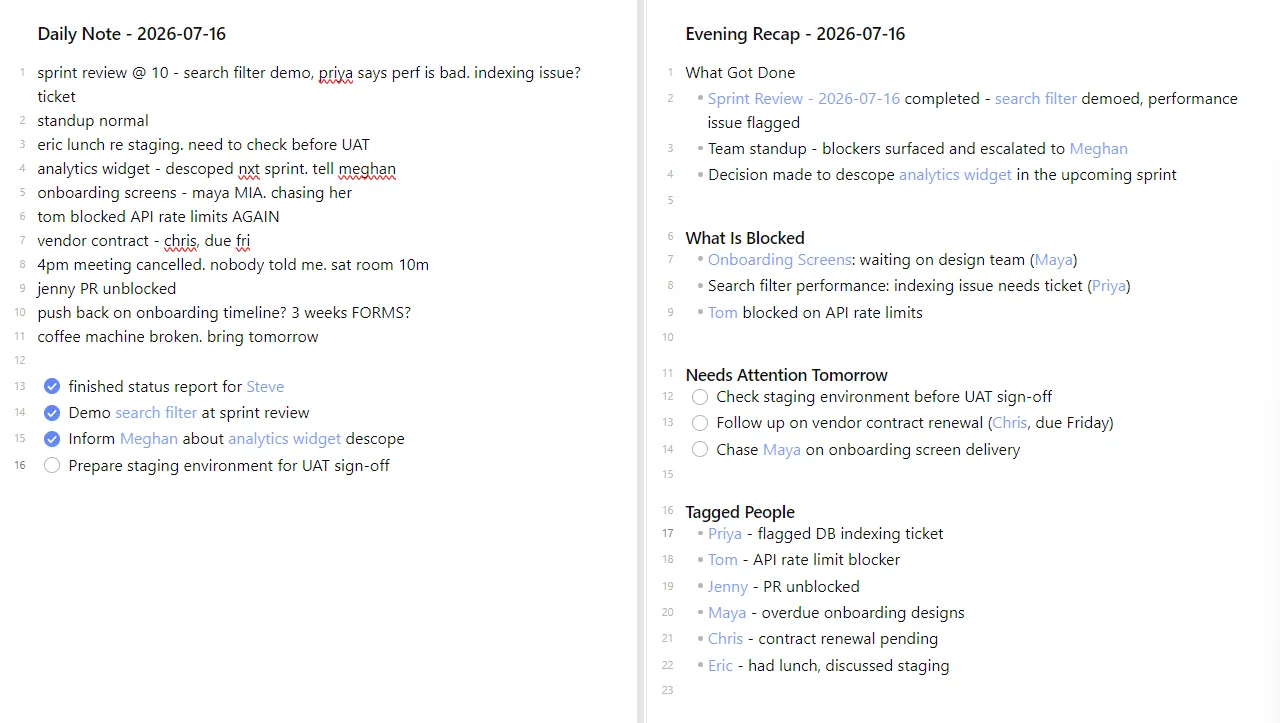
But it’s more than a well formatted version of the raw note. It takes the daily notes and updates my initiatives.
The Initiative Tracking
Each initiative has a file in the Initiatives folder. The agent compiles status updates from daily notes across weeks, so you always have a living picture without manual status reporting.
A typical initiative file covers:
- Current status - where are we right now
- Next steps - what happens this week
- Risks - things that could go wrong
- Blockers - things that are going wrong and need escalation
- Planning horizon - what is up next, roughly scoped
When the business asks for a status update, I do not scramble to gather information. The system has been tracking it daily. I copy the summary, add any last-minute context, and send it. The whole thing takes five minutes.
I also keep a Research folder for market intel, book notes, and customer interviews. Those are manual - something I read or learn that I want to keep. But they are also auto-referenced. When an initiative relates to a customer interview or a competitive analysis I wrote down, the agent surfaces that connection without me asking. The system knows what is relevant to your initiatives and pulls it forward.
The People Layer
Every daily note mentions people. Stakeholders, developers, other POs, the QA lead who just told you the release is at risk. When I mention someone in the daily note the evening recap auto links the main contact note and files the interaction.
Over time, those links build a lightweight CRM:
- Touchpoints with history - you know exactly when you last spoke to someone and what about
- 1:1 prep - when I have the next 1 on 1, all past context is already available. This makes it easy to prepare, give better feedback and gives a holistic picture
- Relationship context - I remember that Alex mentioned his kid’s birthday is this week, so that makes me more considerate when adjusting timelines.
The insight here is simple: you do not need a separate CRM. Your daily notes system becomes one when you consistently link people. And because the linking happens through your normal note-taking, you never have to maintain it. The CRM builds itself.
Scribble Now, Sort Later
Thirty seconds of scribbling. Hours of recap, connecting notes and organizing to-dos - done. That’s working smarter, not harder.
Keep the daily note light so you can keep up with it on your worst days. The recap writes itself. The people get linked. The initiatives stay current. None of that requires extra effort from you.
So scribble now. Sort later.
One side note: the same vault structure can easily grow beyond the PO role. Add a Media/ folder to track books and movies. Add a Knowledge/ folder for research and concepts you want to keep outside of work. Add a Goals/ folder for annual objectives and quarterly check-ins. The system scales with whatever you throw at it, so long as you keep the habit of writing things down in one place.
Last modified: 20 Jul 2026